
Back-to-School Forms in SchoolTool + Web Access Tips
Dear Scotia-Glenville Parents and Guardians,
Last week, we are moved our back-to-school forms to SchoolTool.
Parents and legal guardians can log into SchoolTool to access and complete the following back-to-school forms online:
Parent/Guardian Info + Emergency Contact Update (Students have brought home a printed copy of the contact information currently stored in SchoolTool for your easy reference)
Student Health Info Update
CEP Household Eligibility Form (application for fee waivers)
Parent and Family Chromebook Agreement (Grades 2–12)
NYS Digital Resources Family Questionnaire
Important Access Information
Web Browser Required: These forms must be accessed using the web version of SchoolTool on a computer or mobile browser. They are not available in the SchoolTool mobile app. Please see our quick directions below for accessing SchoolTool and your forms. The direct link to the SchoolTool web version is embedded throughout this post but also here: https://schooltool12.neric.org/SchoolTool_SCOT
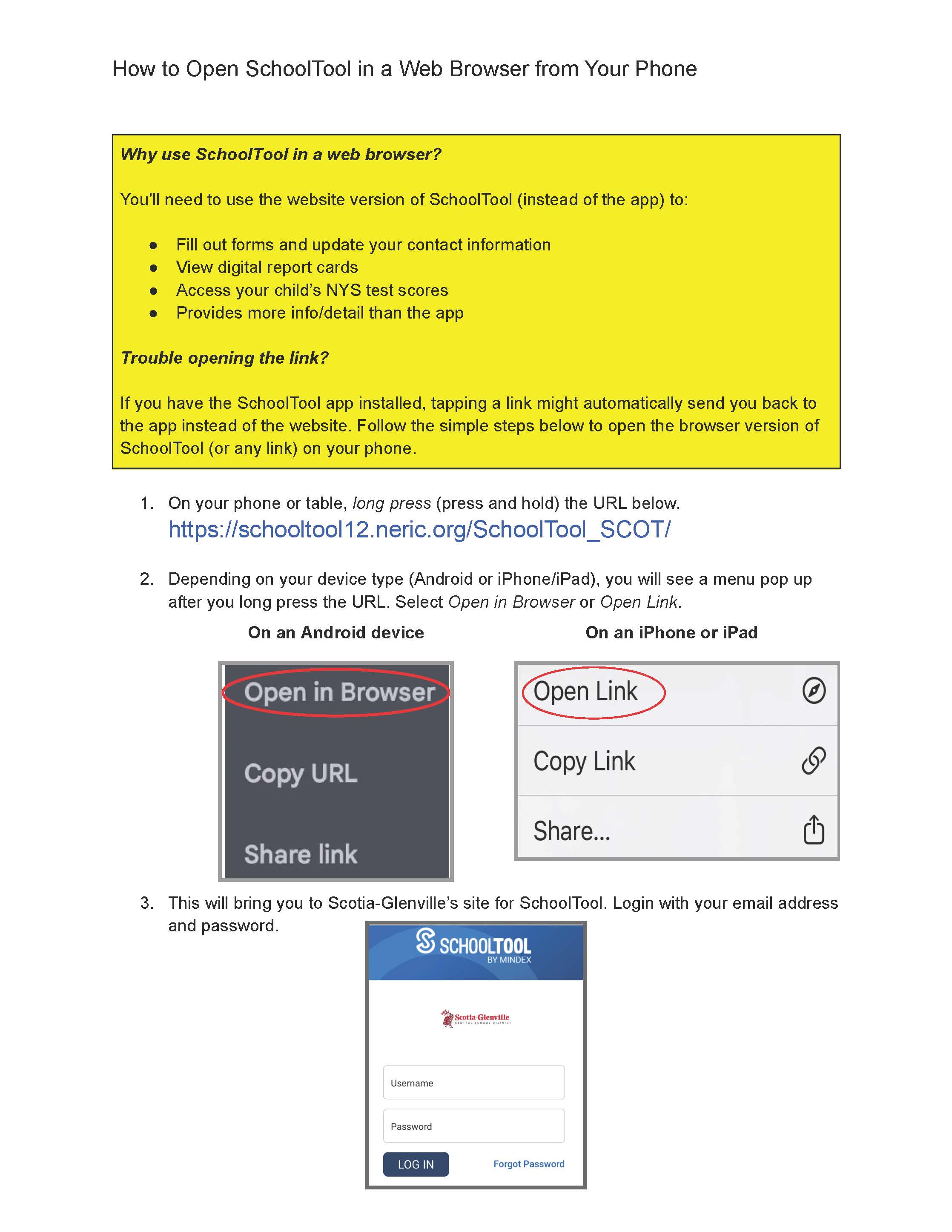
TIP: Need to open the web version of SchoolTool on your phone or tablet? No problem! We've included a help guide guide below (in yellow) to walk you through it.Year-Round Access: You will be able to revisit these forms in SchoolTool throughout the year to update your contact or health information whenever needed.
We know your time is valuable, and we hope this streamlined process simplifies your back-to-school transition. Thank you for your continued partnership!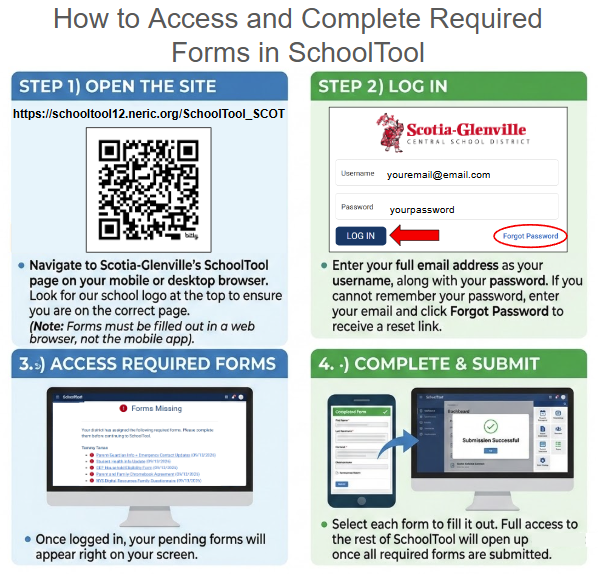
If you have any questions, please contact your child’s school:
Glendaal Elementary: (518) 347-3600 ext. 1900 | Glendaal@sgcsd.net
Lincoln Elementary: (518) 347-3600 ext. 3900 | Lincoln@sgcsd.net
Sacandaga Elementary: (518) 347-3600 ext. 4900 | Sacandaga@sgcsd.net
Scotia-Glenville MS: (518) 347-3600 ext. 5900 | MiddleSchool@sgcsd.net
Scotia-Glenville HS: (518) 347-3600 ext. 6900 | HighSchool@sgcsd.net